Bank & Payment Offer Restrictions — Coupons
Introduction
Bank and payment offer restrictions allow sellers to create coupons that are valid only when the customer uses a specific payment method. This is commonly used for bank-partnered offers (e.g., "10% off with HDFC cards"), wallet-exclusive deals (e.g., "Flat Rs. 100 off with Paytm"), or UPI-specific cashback offers.
When payment restrictions are configured, the system automatically marks the coupon as a bank offer and validates the customer's selected payment method before applying the discount.
Supported Payment Modes
| Mode | Description | Restrictions Available |
|---|---|---|
| CARD | Credit and debit cards | Card type, card network, bank code, card IIN (first 6 digits) |
| NB | Net banking | Bank code |
| WL | Digital wallets | Merchant/wallet code (e.g., PAYTM, AMAZONPAY) |
| UPI | UPI payments | Intent apps (e.g., GooglePay, PhonePe), VPA handles (e.g., @okhdfcbank) |
| COD | Cash on delivery | Typically not used with payment restrictions |
Payment Restriction Fields
Each payment mode can be configured with the following restriction fields:
- Types — Card types allowed (e.g.,
CREDIT,DEBIT). Applicable to CARD mode only. - Networks — Card networks or issuers allowed (e.g.,
VISA,MASTERCARD,RUPAY). Applicable to CARD mode. - Codes — Bank or merchant codes (e.g.,
HDFC,ICICIfor cards/net banking;PAYTM,AMAZONPAYfor wallets). - IINs — Issuer Identification Numbers (first 6 digits of a card number). Used for fine-grained card-level targeting.
- Uses — Payment-specific usage limits:
- Max — Maximum number of times this coupon can be used with this payment mode.
- Remaining — Remaining uses (auto-decremented on each use).
- Meta (UPI-specific):
- Intent Apps — Allowed UPI apps (e.g.,
GooglePay,PhonePe,Paytm). - VPA Handles — Allowed VPA providers (e.g.,
@okhdfcbank,@icici).
- Intent Apps — Allowed UPI apps (e.g.,
How the Bank Offer Flag Works
When you add payment restrictions to a coupon, the system automatically sets the Bank Offer flag (is_bank_offer: true). You do not need to set this manually.
- Payment restrictions present →
is_bank_offeris set totrueautomatically. - No payment restrictions →
is_bank_offeris set tofalseautomatically.
The bank offer flag is used by the storefront to display the coupon with appropriate labels (e.g., "Bank Offer", "Pay with HDFC to avail").
Creating a Coupon with Payment Restrictions
-
In the platform sidebar, expand your sales channel under SALES CHANNEL, click Marketing, then click Offers. Select the Coupons tab. Click Create.
-
Select the coupon type (e.g., X Percentage Value, X Amount Value, etc.) and fill in the basic details — coupon code, display name, offer text, and discount configuration.
-
Scroll to the Restrictions section. Expand the Payment Mode configuration.
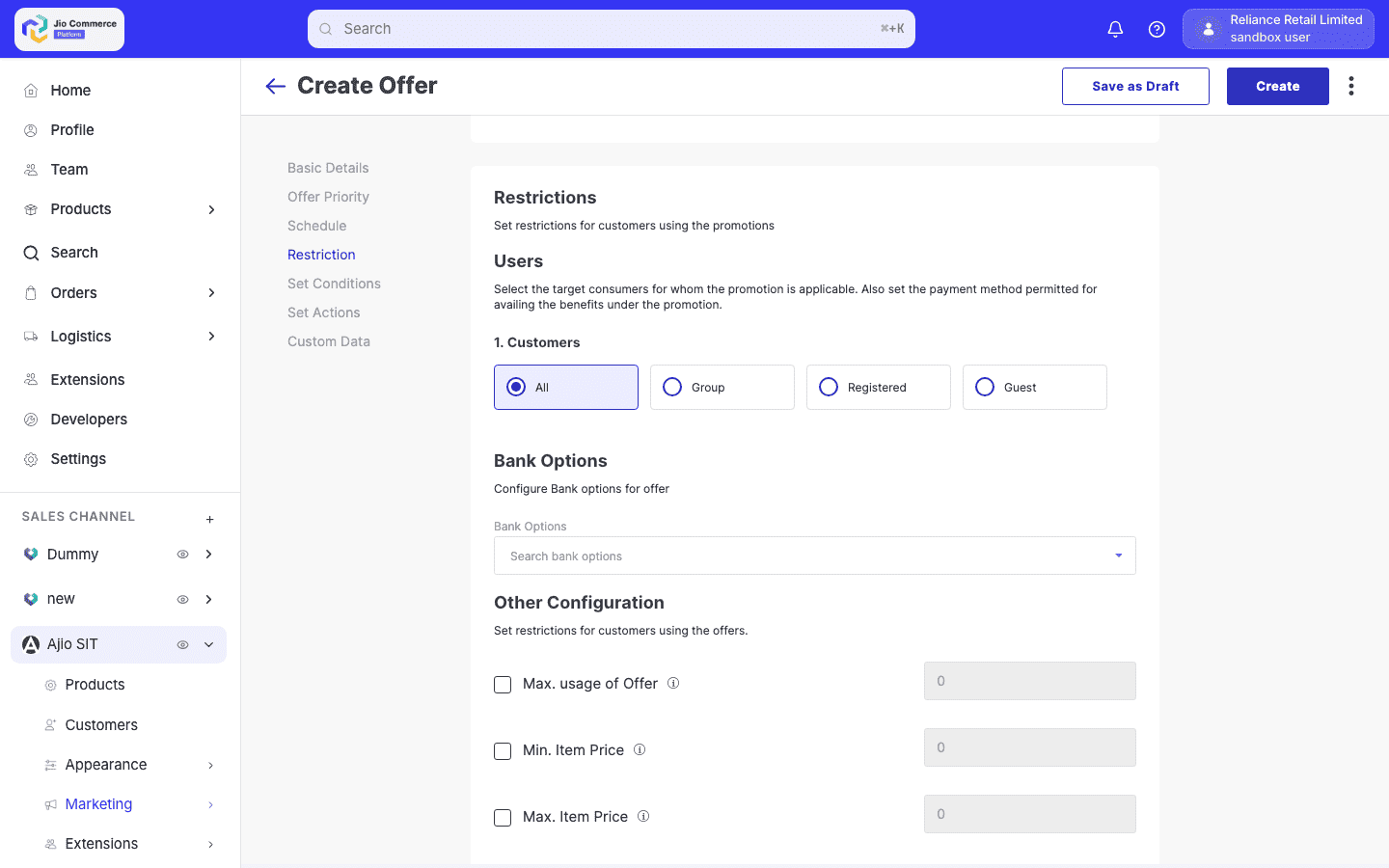
- Add a payment mode restriction:
- Select the Payment Mode (e.g., CARD, NB, WL, UPI).
- Configure the allowed Codes (bank codes or merchant codes).
- For CARD mode, optionally set Types (CREDIT, DEBIT), Networks (VISA, MASTERCARD), or IINs (card prefixes).
- For UPI mode, optionally set Intent Apps or VPA Handles.
- Set the Max Uses for this payment mode if you want a per-payment-mode usage cap.
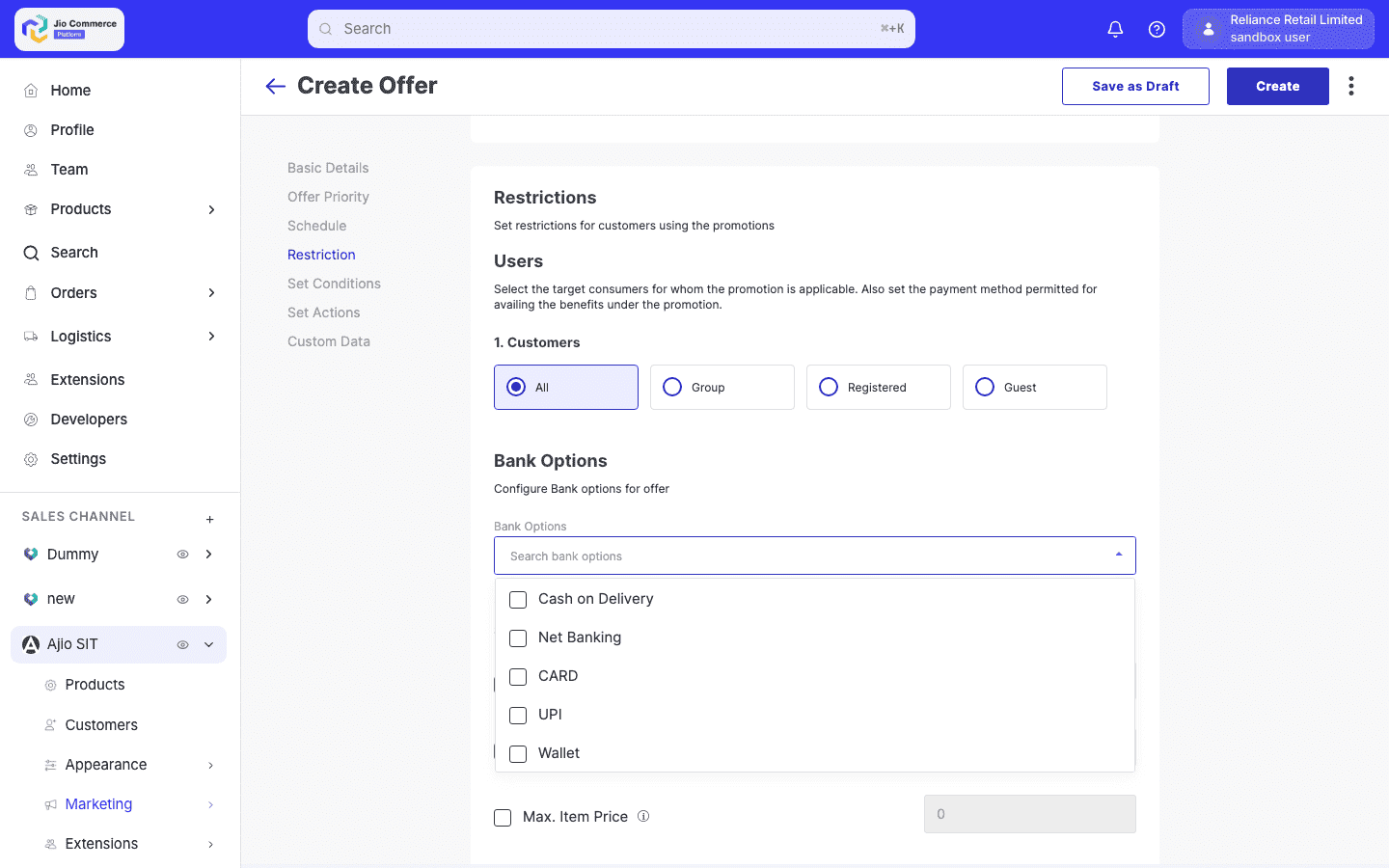
-
You can add multiple payment modes to a single coupon. For example, allow both HDFC credit cards and ICICI net banking.
-
Complete the remaining fields (schedule, usage limits, etc.) and save the coupon.
Validation at Checkout
When a customer applies a coupon with payment restrictions, the following validation flow runs:
-
Coupon applied, no payment selected yet — The coupon is tentatively accepted. The system flags it for validation when the customer selects a payment method.
-
Customer selects payment method — The system validates:
- Is the payment mode (CARD, NB, WL, UPI) in the allowed list?
- Does the bank code, card network, card type, or IIN match the restriction?
- For card payments, the system fetches card details (IIN, bank code, network, type) and matches them against the restriction.
-
Validation passes — The coupon remains applied and the discount is shown.
-
Validation fails — The coupon is automatically removed with a message indicating it is not applicable for the selected payment method.
-
Customer switches payment — If the customer changes their payment method, the coupon is re-validated. If the new method doesn't qualify, the coupon is removed. If the customer switches back to a qualifying method, the coupon can be re-applied.
If a customer applies a bank offer coupon and then changes to a non-qualifying payment method at checkout, the coupon is automatically removed. The customer must re-apply the coupon after switching back to a qualifying payment method.
Example: HDFC Credit Card Offer
A seller wants to create a "10% off with HDFC credit cards, max Rs. 500 off" coupon:
- Coupon type: X Percentage Value
- Coupon code:
HDFC10 - Discount: 10%, max discount Rs. 500
- Payment restriction:
- Mode: CARD
- Codes:
HDFC - Types:
CREDIT
- Schedule: Valid for 30 days
The system automatically sets is_bank_offer: true. On the storefront, the coupon displays with a "Bank Offer" badge. The discount applies only when the customer pays with an HDFC credit card.