Bank & Payment Offer Restrictions — Promotions
Introduction
Bank and payment offer restrictions on promotions let sellers run automatically applied discounts tied to specific payment methods. Unlike coupon-based bank offers (where the customer enters a code), payment-restricted promotions are evaluated and applied by the system when the customer selects a qualifying payment method at checkout.
This is commonly used for bank-partnered campaigns (e.g., "Extra 15% off with SBI cards"), EMI offers, wallet promotions, or UPI-exclusive discounts.
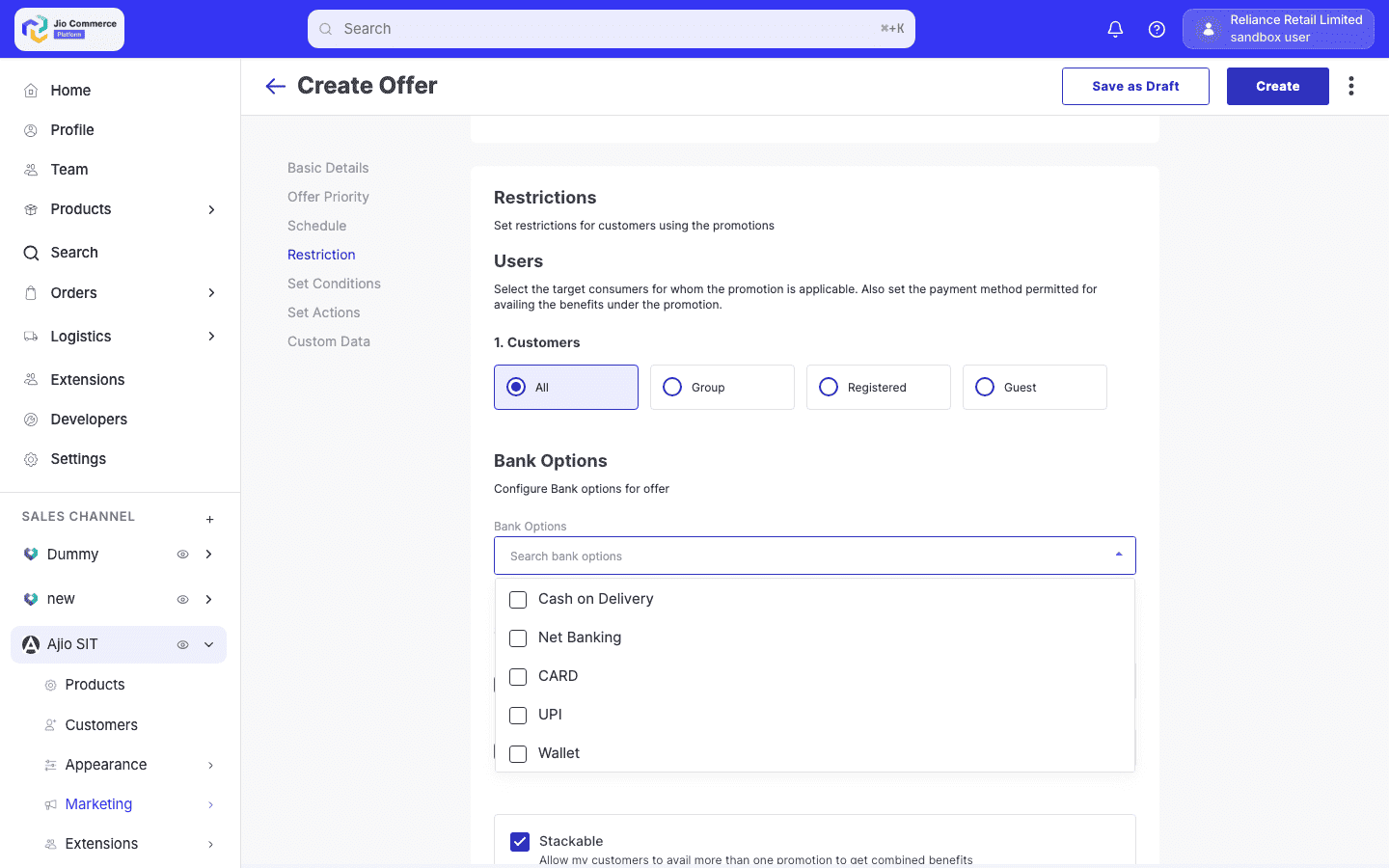
Supported Payment Modes
| Mode | Description | Restrictions Available |
|---|---|---|
| CARD | Credit and debit cards | Card type, card network, bank code, card IIN |
| NB | Net banking | Bank code |
| WL | Digital wallets | Merchant/wallet code |
| UPI | UPI payments | Intent apps, VPA handles |
Payment Restriction Fields
The restriction structure for promotions is identical to coupons. Each payment mode supports:
- Types — Card types (e.g.,
CREDIT,DEBIT). CARD mode only. - Networks — Card networks (e.g.,
VISA,MASTERCARD,RUPAY). CARD mode only. - Codes — Bank or merchant codes (e.g.,
HDFC,ICICI,PAYTM). - IINs — Card IIN prefixes (first 6 digits) for fine-grained card targeting.
- Uses — Per-payment-mode usage limits:
- Max — Maximum uses with this payment mode.
- Remaining — Auto-decremented remaining uses.
- Meta (UPI-specific):
- Intent Apps — Allowed UPI apps (e.g.,
GooglePay,PhonePe). - VPA Handles — Allowed VPA providers (e.g.,
@okhdfcbank).
- Intent Apps — Allowed UPI apps (e.g.,
How Payment-Restricted Promotions Differ from Coupons
| Aspect | Coupon with Payment Restriction | Promotion with Payment Restriction |
|---|---|---|
| Application | Customer enters a coupon code | Automatically applied by system |
| Validation timing | On code entry + at payment selection | On every cart recalculation + at payment selection |
| Visibility | Shown in coupon list on storefront | Shown on PDP and cart if eligible |
| Usage tracking | Per coupon code | Per promotion ID |
| Bank offer flag | Auto-set from payment restrictions | Auto-set from payment restrictions |
Creating a Promotion with Payment Restrictions
-
In the platform sidebar, expand your sales channel under SALES CHANNEL, click Marketing, then click Offers. Select the Promotions tab. Click Create.
-
Select the promotion type (e.g., Percentage, Amount, BOGO, etc.) and fill in the basic details — name, description, offer text, and discount configuration.
-
Configure the Buy Rules to define which items or cart conditions trigger the promotion.
-
Scroll to the Restrictions section. Expand the Payment Mode configuration.
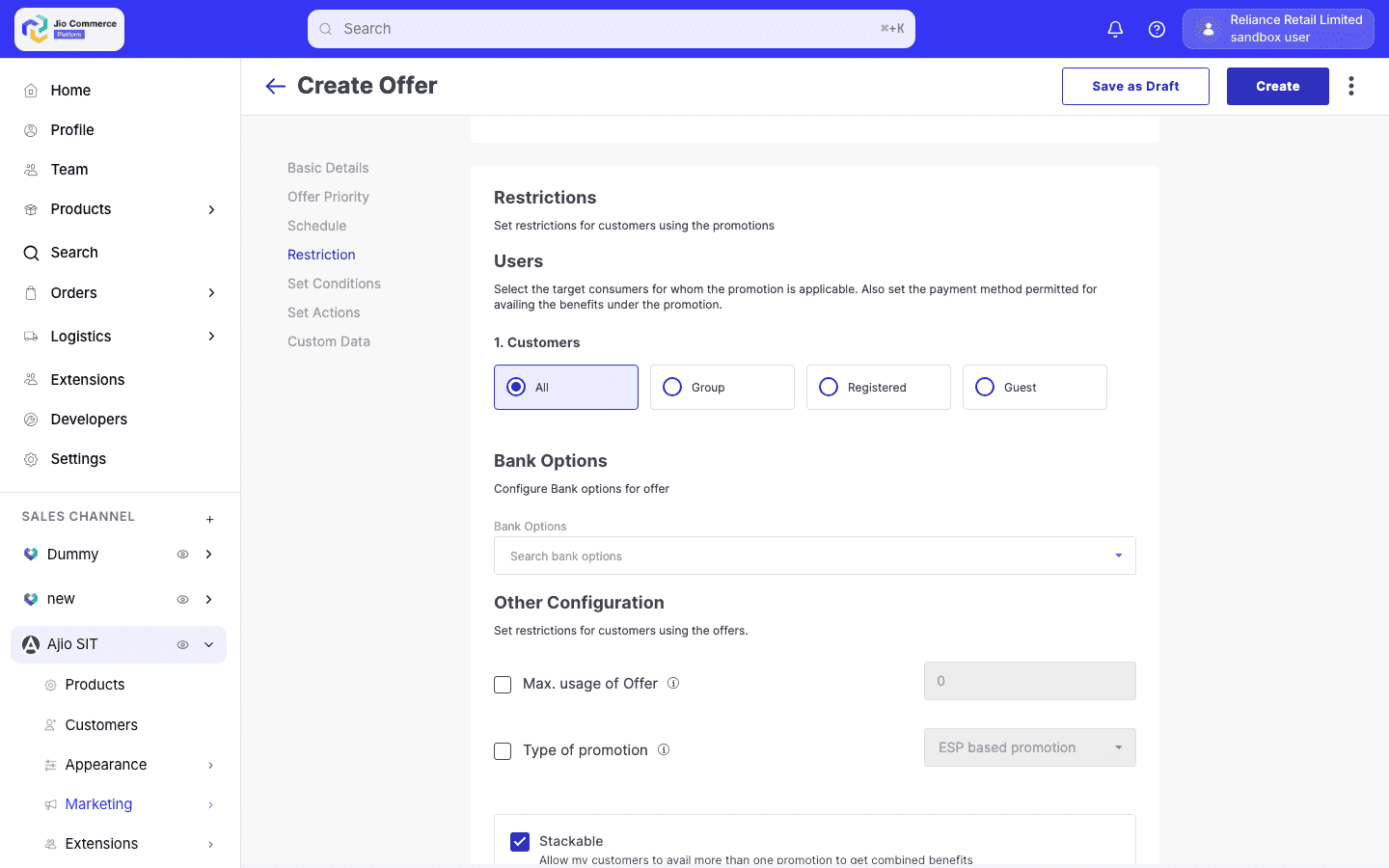
- Add a payment mode restriction:
- Select the Payment Mode (CARD, NB, WL, UPI).
- Enter the Codes — bank codes, wallet providers, or merchant codes.
- For CARD mode, optionally set Types, Networks, or IINs.
- For UPI mode, optionally set Intent Apps or VPA Handles.
- Set the Max Uses for the payment mode if needed.
- Complete the schedule, priority, stacking settings, and other restrictions. Set the status to Approved to activate.
Validation Flow
-
Cart view — The promotion is evaluated against the cart. If the cart meets the buy rules but no payment method is selected yet, the promotion is flagged for payment validation.
-
Payment selection — When the customer selects a payment method:
- The system checks if the selected payment mode, bank code, card type, network, or IIN matches the restriction.
- For card payments, the system fetches card details (IIN, bank code, card brand, card type) and validates against the restriction.
-
Validation passes — The promotion is applied and the discount is reflected in the cart.
-
Validation fails — The promotion is not applied. The storefront may show the offer as "available with [specific payment method]" to guide the customer.
-
Payment method change — If the customer switches payment methods, all payment-restricted promotions are re-validated. Promotions are added or removed based on the new payment method.
Payment-restricted promotions may appear on the Payment Offers section at checkout, showing which offers the customer can unlock by choosing a specific payment method.
Payment Offers API (Storefront)
The storefront can fetch payment-specific offers using the Payment Offers endpoint. This returns all promotions available for specific payment methods, allowing the frontend to display them during payment selection.
The endpoint returns:
- Promotion name and offer text
- Applicable payment modes
- Discount details
- Eligibility status based on the current cart
Example: SBI Card Offer
A seller creates a "Flat Rs. 200 off on SBI credit/debit cards" promotion:
- Promotion type: Amount
- Promotion name: "SBI Card Offer — Rs. 200 Off"
- Discount: Rs. 200 flat
- Buy rules: All items, cart total > Rs. 1000
- Payment restriction:
- Mode: CARD
- Codes:
SBI - Types:
CREDIT,DEBIT
- Usage limits: Max 1 per user
The promotion is automatically applied when a customer with Rs. 1000+ cart selects an SBI card at checkout. If the customer switches to Paytm wallet, the Rs. 200 discount is removed.